Evaluating the 3D Bunny Multilayer Laser Cut File for Home Decor Projects
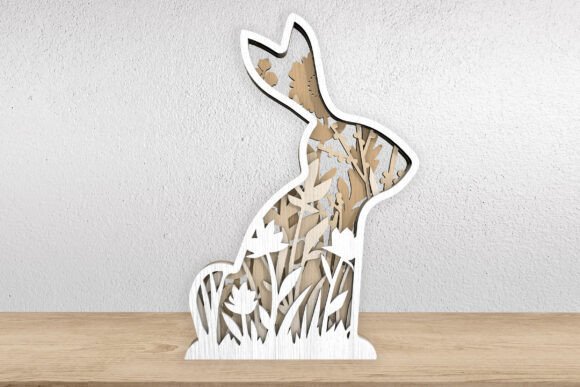
For makers and hobbyists utilizing laser cutting technology, finding designs that balance aesthetic appeal with structural integrity is a constant pursuit. The 3D Bunny Multilayer Laser Cut File represents a specific category of digital assets designed to create dimensional artwork through layered assembly. This design features a sitting bunny silhouette filled with elegant floral and grass details, offering a sophisticated alternative to flat, single-layer cutouts. Understanding the technical requirements, assembly process, and final application of this file type is essential for determining whether it aligns with your current project goals and machine capabilities.
Understanding the Design Structure
The core concept behind this digital product is multilayer construction. Unlike traditional vector files that produce a single flat piece of material, this design is segmented into multiple distinct layers. When stacked, these layers create depth and shadow, resulting in a three-dimensional effect. The subject matter—a sitting bunny surrounded by internal floral motifs—requires precise alignment to ensure the intricate details remain visible and structurally sound.
The file package typically includes a comprehensive set of formats, such as SVG, AI, DWG, EPS, DXF, and PDF. This variety ensures compatibility with a wide range of software ecosystems, from professional CAD programs like AutoCAD to user-friendly platforms used with machines like Glowforge. The inclusion of these formats allows users to import the design directly without needing complex conversion tools, which can sometimes introduce errors or scaling issues.
Benefits of Multilayer Laser Cutting
One of the primary advantages of using a 3D Bunny Multilayer Laser Cut File is the visual impact of the finished piece. The layering technique adds a level of sophistication that flat cuts often lack. By varying the thickness of the material or using contrasting colors for different layers, makers can highlight specific elements, such as the floral details inside the bunny’s silhouette. This makes the final product suitable for high-visibility applications like wall art or centerpiece decorations.
Another benefit is the versatility of the design. With a standard height of nine inches, the scale is substantial enough to serve as a standalone decorative item but small enough to fit on shelves or tables. Furthermore, because the files are vector-based, they can be resized easily. This scalability allows users to adapt the design for different contexts, such as creating smaller versions for gift tags or larger versions for prominent wall displays, provided the material thickness is adjusted proportionally to maintain structural integrity.
Technical Considerations and Machine Compatibility
Before purchasing or downloading any digital laser cut file, it is crucial to assess machine compatibility. While the 3D Bunny Multilayer Laser Cut File is optimized for popular machines like Glowforge, users must ensure their specific hardware can handle the complexity of the design. Intricate internal cuts, such as the grass and floral patterns, require a laser cutter with sufficient precision and power consistency. Machines with lower resolution or unstable beds may struggle with these fine details, potentially leading to broken pieces or incomplete cuts.
Material selection also plays a critical role in the success of this project. Wood is the most common medium for this type of decor, but the choice of wood matters. Plywood offers stability and consistent thickness, which is vital for accurate layer stacking. Solid woods may have grain variations that affect cutting speed and edge quality. Additionally, the adhesive method used for assembly should be considered. Thin layers of wood glue or double-sided tape are typical, but the visibility of adhesive lines can detract from the aesthetic if not applied carefully.
Assembly and Skill Requirements
While the design is marketed as suitable for both beginners and professionals, it does require a basic understanding of digital file management and laser cutting software. Users must be comfortable importing files, setting cut parameters, and organizing layers within their software interface. The assembly process itself demands patience and precision. Aligning multiple layers perfectly is necessary to achieve the intended 3D effect. Misalignment can obscure details or create an uneven appearance.
For beginners, this project serves as an excellent introduction to multilayer techniques. It provides a structured workflow where each step builds upon the previous one. However, those new to laser cutting should practice with simpler, fewer-layer designs before attempting complex silhouettes with internal details. Understanding how kerf—the width of the laser cut—affects fit is also important. Some files account for kerf compensation, while others do not, requiring manual adjustment by the user to ensure tight fits between layers.
Ideal Use Cases
This design is particularly well-suited for seasonal decorations, especially around Easter and spring holidays. The bunny motif is universally recognized and appreciated, making it a safe choice for home decor that appeals to a broad audience. Beyond seasonal use, the elegant floral elements allow it to function as year-round wall art or table decoration. It can also be customized with paint or stains to match specific interior design themes, adding a personal touch to mass-produced digital designs.
Small business owners who sell handmade goods may find this file valuable for creating inventory quickly. Since the design is digital, it can be reproduced indefinitely without additional design costs. However, producers should consider the time required for assembly when pricing their products. Multilayer items take significantly longer to assemble than single-layer cuts, which impacts labor costs and production throughput.
When to Consider Alternatives
Despite its advantages, the 3D Bunny Multilayer Laser Cut File may not be the best choice for every situation. If speed is a priority, single-layer designs are faster to cut and require no assembly. For outdoor applications, multilayer wood constructions may be less durable due to exposure to moisture and temperature changes, which can cause warping or delamination. In such cases, metal or plastic single-layer cuts might be more appropriate.
Additionally, users with limited workspace or clamping tools may find the assembly process challenging. Proper alignment often requires jigs or fixtures to hold layers in place while adhesive dries. If these tools are unavailable, the risk of misalignment increases. Finally, if the target audience prefers minimalist or modern aesthetics, the intricate floral details might appear too ornate. In those instances, simpler geometric designs or solid silhouettes might better meet the desired stylistic goals.
Making an Informed Decision
Choosing the right digital file involves balancing aesthetic preferences with technical capabilities. The 3D Bunny Multilayer Laser Cut File offers a compelling option for those seeking to create detailed, dimensional decor. Its compatibility with various file formats and machines makes it accessible, while the multilayer structure provides a premium look. However, success depends on careful material selection, precise machine settings, and patient assembly.
By evaluating your machine’s precision, your comfort with assembly tasks, and your intended use for the final product, you can determine if this design meets your needs. For those willing to invest the time in proper execution, the result is a high-quality decorative piece that showcases the capabilities of laser cutting technology. Always verify file compatibility with your specific software before beginning, and consider starting with a test cut on scrap material to refine your settings for the intricate details.